Get 12 Testers for Google Play Closed Testing
Real Android testers on real devices who stay engaged for the full 14 days — so you complete the requirement and get to production access without chasing anyone.
- 12 real testers
- 14-day engagement
- Real devices
- Dropout protection
- Money-back guarantee
- Production access success
- 98.4%
- Production access success
- Apps published
- 1,500+
- Apps published
- Developers served
- 1,200+
- Developers served
- Tester matching
- 24h
- Tester matching
Closed testing campaign
14-day window
Plus 3 buffer testers, so one dropout never breaks the count.
- Devices
- Real phones
- Engagement
- Daily
- Dropouts
- Replaced
Day 14: apply for production access
Full refund if Google rejects your application over tester engagement.
To publish an app on Google Play with a personal developer account created after November 13, 2023, Google requires a closed test with at least 12 opted-in testers continuously active for 14 consecutive days. TesterBee provides 12 verified Android testers on physical hardware within 24 hours, includes a 14-15 tester buffer to prevent clock resets, and provides full questionnaire guidance backed by a money-back guarantee.
Watch how TesterBee gets you 12 testers
A quick walkthrough of the service — from submitting your opt-in link to seeing your 12 testers engage.
Why Google requires 12 testers
Every new personal developer account must complete a 14-day Closed Testing period with at least 12 real testers before applying for production access. Here is what Google actually requires.
Since November 13, 2023, every new personal Google Play developer account must complete a 14-day Closed Testing period with at least 12 real testers before applying for production access. Google introduced this requirement to combat low-quality and spam apps, and to ensure apps are validated by real users before release.
Here is what the requirement actually says: when you apply for production access, at least 12 testers must be opted in to your closed test, and they must have been opted in continuously for the last 14 days. "Opted in" means a tester accepted your invite to the closed test and stayed in the track. The 14 days count from the point 12 testers are continuously opted in — not from the day you upload your app.
Google also expects those testers to be engaged with the app. If testers are not actually using it, Google may ask you to continue testing for longer. The practical takeaway: recruit a small buffer of 14-15 testers, keep them genuinely using the app, and only apply once the clock has fully run.
Key point
Use genuine testers and follow Google's testing requirements rather than relying on artificial or automated activity. The requirement exists so real users validate your app — treat it that way.
What happens if you fail?
If Google rejects your production access application, you must run another 14-day testing cycle from scratch. Some developers have gone through 3-4 cycles, losing 6-8 weeks before finally passing. Each failed cycle costs real time and delays revenue from your app. See our guide on production access to avoid common mistakes. A one-time $14.99 investment in verified testers is small compared to losing weeks of potential app revenue — see exactly what the 14-day service includes.
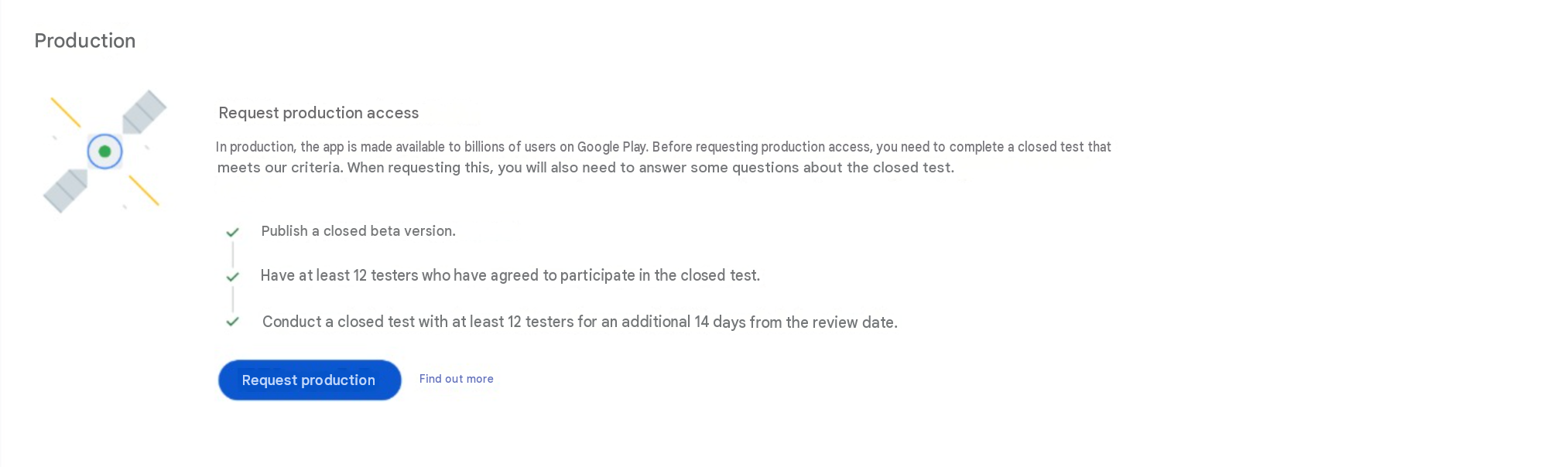
14-day testing complete — production access is one click away in Play Console.
Does the 12 tester rule apply to your account?
The 12-tester, 14-day Closed Testing requirement applies to all new personal Google Play developer accounts created after November 13, 2023. Here is a quick reference to determine if the requirement applies to your situation.
| Your situation | 12 testers required? |
|---|---|
| New personal account (created after Nov 2023) | Yes — mandatory |
| Personal account created before Nov 2023, but no published apps | Yes — likely required |
| Personal account with at least one published production app | No — exempt |
| Organization account with D-U-N-S number | No — currently exempt |
| Organization account without D-U-N-S | Yes — required |
Note: Google has indicated that organization accounts may eventually be included in this requirement. Check your Play Console dashboard under "Production access" to confirm your specific status. See our detailed Closed Testing requirement guide to confirm your situation.
How to find 12 testers
The 14-day requirement needs people who will actually use your app. Here are the realistic routes, and the trade-offs of each.
Friends and family
Free, and you already trust them. The catch is retention — friends lose interest fast, and if anyone drops out you fall below 12 and the clock resets.
Developer communities
Reddit, Discord, and Android forums have people willing to test. It is free but slow to recruit, and you cannot control whether they stay engaged for the full 14 days.
Your existing users
If your app already has an audience, this is the strongest option — these are people who actually want the app, so engagement comes naturally.
A managed service like TesterBee
We match you with 12 real testers within 24 hours, keep them engaged for the full 14 days, and replace anyone who drops out — so you stay above the minimum.
For a full side-by-side comparison of every method — cost, timeline, and reliability — see our complete guide to getting 12 testers.
Why developers choose TesterBee for their 12 testers
A managed testing campaign — not a list of email addresses. Everything included to pass on schedule.
Real people, real devices
Every tester owns a unique Android device with a verified Google account. No emulators, no bots, no fake accounts — the only approach that keeps your production access safe.
14-day engagement guarantee
Testers open your app daily for the full 14 days. We monitor engagement and keep you above the 12-tester threshold at all times.
Production access or refund
If Google rejects your application due to tester engagement issues, we refund your payment. We stand behind our tester quality.
Matched in 24 hours
Most campaigns are live within 6-12 hours. You do not wait days or weeks for testers to trickle in from forums or social media.
Dropout protection built in
We assign 14-15 testers as a buffer. If one becomes inactive, you still stay above the 12-tester minimum without any disruption.
Works for any app category
Games, productivity, fitness, education, finance, social — our tester pool covers every Android app category and device type.
Production access support
We guide you through the 6-question production access form with specific, reviewer-ready answers based on your testing data.
1,200+ developers served
Join over a thousand Android developers who have used TesterBee to pass Google Play Closed Testing and publish to production.
The TesterBee guarantee
Every plan is protected — if the service isn't delivered as promised, you're covered.
14-day engagement guarantee
Testers stay active for the full period or they are replaced — free.
Dropout replacement
We assign 14-15 testers as a buffer and replace anyone who goes inactive.
Money-back guarantee
Full refund if Google rejects your application due to tester engagement issues.
Start your 14-day campaign today. 12 testers matched within 24 hours — or your money back.
Start your campaignTesterBee does not guarantee Google Play approval — Google makes that decision. If your production access is rejected due to tester engagement issues, you get a full refund.
How TesterBee gets you 12 testers
From sign-up to production access, in three steps.
Sign up and submit your link
Create your TesterBee account and paste your Play Console Closed Testing opt-in URL. That is all you need to provide.
Get matched within 24 hours
We match you with 12 verified Android testers. They opt in via your Play Console link and install your app on their personal devices.
Pass in 14 days
Testers engage daily. We monitor activity, replace dropouts, and guide you through the production access application.
Developers who passed with TesterBee
1,500+ apps have been published through TesterBee. Here are two real stories from developers who used our 12-tester service to pass Google Play Closed Testing.
"I spent two weeks trying to get testers from Reddit and Discord. Maybe 4 people opted in, and 2 dropped out within days. I was stuck. TesterBee matched me with 12 testers in less than 12 hours. They used the app daily, provided actual bug reports with screenshots, and I got production approval on my first attempt. The $14.99 was the best money I spent on my app."
"Extremely reliable testing service. The dashboard makes it easy to track tester engagement, device models, and remaining days. Highly recommended for solo developers who do not have a network of Android users. My fitness tracker app was approved on the first attempt. The feedback reports helped me fix two crashes I had missed in my own testing."
Ratings you can click and check


TesterBee vs doing it yourself
DIY testers, freelance sellers, and managed services are not the same thing. Here is how they stack up on what actually gets you approved.
| What matters | TesterBee | DIY (friends/forums) | Freelance |
|---|---|---|---|
| Cost | $14.99 one-time | $0 (High time investment) | $50-$150 or monthly |
| Matching speed | Under 24 hours | 3-14 days on forums | 1-3 days |
| Hardware authenticity | Physical Android devices (no bots) | Unverified / mixed | High emulator risk |
| 14-day retention | Guaranteed with 14-15 buffer | Frequent dropouts (resets clock) | High dropout risk |
| Dropout replacement | Automated same-day replacement | Must recruit again manually | Extra fee or unmanaged |
| Daily activity tracking | Automated daily monitoring | Manual follow-ups | None |
| Production questionnaire guidance | Included with reviewer templates | None | None |
| Production access pass rate | 98.4% total approval | 72% first-attempt across all campaigns | Unverifiable / high rejection |
| Refund guarantee | Full refund if rejected for tester issues | None | Rarely offered |
Production access rates for DIY and freelance routes are self-reported estimates from developer forums and communities, not audited figures. TesterBee's 98.4% reflects its own campaign results. Individual results vary based on app quality and Google's review process.
Pick your tester package
One-time payment per app. Every plan includes managed 14-day testing, dashboard tracking, dropout replacement, and the money-back guarantee.
12 testers
Google minimum
Meet the requirement exactly
one-time · per app · 14 days
- Verified Android testers on real devices
- 14-day engagement guarantee
- Dropout replacement included
- Live engagement dashboard
- Production access questionnaire support
- Money-back guarantee if rejected due to tester issues
15 testers
With buffer
Stay above 12 if one drops out
one-time · per app · 14 days
- Verified Android testers on real devices
- 14-day engagement guarantee
- Dropout replacement included
- Live engagement dashboard
- Production access questionnaire support
- Money-back guarantee if rejected due to tester issues
20 testers
Extra confidence
More data and faster feedback
one-time · per app · 14 days
- Verified Android testers on real devices
- 14-day engagement guarantee
- Dropout replacement included
- Live engagement dashboard
- Production access questionnaire support
- Money-back guarantee if rejected due to tester issues
25 testers
Maximum safety
Best for mission-critical launches
one-time · per app · 14 days
- Verified Android testers on real devices
- 14-day engagement guarantee
- Dropout replacement included
- Live engagement dashboard
- Production access questionnaire support
- Money-back guarantee if rejected due to tester issues
Multiple apps? Pricing is per app with multi-app discounts available — see full details on the pricing page.
The 14-day timeline, day by day
The 14 days are calendar days — weekends and holidays count. Here is what happens at each stage and what Google expects to see.
Setup and opt-in
Upload your AAB to Play Console Closed Testing track. Share the opt-in link with your 12 testers. All testers should install the app and complete their first session. Google begins tracking engagement from day one.
Active testing and feedback
Testers explore core features daily. Collect bug reports, UI feedback, and device compatibility notes. Push at least one update during this window — it keeps testers engaged and shows you are responding to feedback.
Sustained engagement
This is where most DIY testers drop off. Maintain daily check-ins with your testers. Monitor Play Console for crash rates and ANR rates. Address any issues testers report.
Apply for production access
After 14 full days of consistent testing with 12+ active testers, submit your production access application. Answer all 6 questionnaire questions with specific details about tester feedback and the changes you made.
Good practice: push at least one update
Iterating during the 14 days — even a small bug fix — shows you are actively developing and responding to tester feedback. It also gives testers a reason to keep coming back: people stay engaged when they see the app improving, and engaged testers are what the requirement needs.
Real devices, real engagement
The requirement centers on genuine testers using your app. Here is how real devices and a spread of hardware help you approach it well.
The requirement is about testers who genuinely use your app, and that happens on real Android devices — physical phones, not emulators or virtual machines. Emulators do not represent how a real user experiences your app, so real-device testers are the safe, sensible choice for meeting the requirement.
Testers do not need the latest flagship phone. A spread of devices — different manufacturers (Samsung, Google Pixel, OnePlus, Xiaomi, Motorola) and Android versions — is useful because it shows your app works across the Android ecosystem, which is exactly what a production release needs. It is good testing practice, and it makes your application stronger.
Note that iPhone users cannot test your Android app — Google Play Closed Testing requires Android devices with a Google account. Every TesterBee tester has a verified Android device, and our pool covers a wide range of manufacturers and OS versions.
What Google checks before approving your app
Passing the 14-day requirement is necessary but not sufficient. Google's reviewers evaluate several dimensions before granting production access. Understanding what they look for helps you prepare a stronger application.
Tester engagement and consistency
Reviewers look at whether your testers genuinely used the app over the 14 days — not just whether they opted in. Testers who install once and never return do not demonstrate real validation. The strongest applications show consistent, daily usage across the full period: testers returning on multiple days, exploring different screens, and spending real time in the app.
Real devices and a spread of hardware
Testing happens on real Android devices — physical phones, not emulators or virtual machines. A spread of devices across manufacturers (Samsung, Google Pixel, OnePlus, Xiaomi, Motorola) and Android versions is good practice: it shows your app works across the ecosystem, which is exactly what a production release needs. It is simply better testing, and it makes your application stronger.
Evidence of a real feedback loop
The single strongest signal is proof that testers gave feedback and you acted on it. Push at least one update that references tester feedback in the changelog. Keep screenshots of tester messages or feedback forms. In your production access questionnaire, mention specific bugs found by testers and the exact changes you made to fix them. Vague statements like "testers were happy" carry little weight — specifics do.
App quality and policy compliance
The Closed Testing requirement does not replace Google's standard app review. Your app must still meet Google's quality bar: no crashes on common devices, complete and accurate store listing, valid privacy policy URL, appropriate content rating, no restricted permissions without justification, and compliance with Google Play Developer Program Policies.
Developer account standing
Your developer account must be in good standing with completed identity verification, a verified payment method, no outstanding policy strikes, and no history of app rejections or suspensions. If your account has issues, fix them before starting your testing period.
How to set up closed testing in Google Play Console
Before your testers can begin, your Google Play Console must be configured correctly. Many developers miss a step and wonder why nothing is happening. Use this checklist.
Verify your developer account is fully set up
Log into Play Console. Confirm your account has completed identity verification and that your $25 registration fee has been processed. If you see a banner asking you to complete verification, your Closed Testing track will not function properly until this is resolved.
Create a Closed Testing track (not Internal Testing)
Go to Testing > Closed Testing in the left sidebar. Click "Create track" if one does not exist. Time spent in an Internal Testing track does not count toward the 14-day requirement. For a full walkthrough, see our Play Console Closed Testing setup guide.
Upload a signed release AAB (not a debug build)
Build your app as a signed release Android App Bundle (.aab) in Android Studio. Debug builds will be rejected. Verify that your keystore is saved — you will need the same keystore for all future updates.
Complete your store listing for Closed Testing
Even though your app is only in Closed Testing, Google requires a complete store listing: app name, short description, full description, at least 2 screenshots, a high-resolution app icon, a feature graphic, and a privacy policy URL. An incomplete listing will delay or prevent your production access review.
Add testers to your Closed Testing track
Go to the "Testers" tab within your Closed Testing track. Add tester email addresses individually, via CSV upload, or via a Google Group. Each email must be associated with a Google account. After adding, copy the opt-in URL generated by Play Console — this is the link you send to your testers.
Select available countries
Under the "Countries / regions" tab, select the countries where your testers are located. If a tester is in India and you only selected the United States, they will see an "App not available in your country" error. If using TesterBee, we will tell you which countries to enable based on your matched tester locations.
Roll out your release and start testing
Go to the "Releases" tab, click "Create new release," upload your AAB, add release notes, and click "Start rollout to Closed Testing." Your app will be available to your testers within a few hours. The 14-day clock starts when the 12th tester opts in.
Monitor the dashboard (but do not panic)
The Play Console dashboard updates slowly — expect 24-48 hour delays for tester counts and engagement data. Check every 2-3 days, not every hour. Most "missing tester" issues resolve themselves as the console syncs.
Framework-specific testing guides
Every framework builds Android apps differently. Choose the guide that matches your tech stack for AAB build instructions and Play Console setup.

Senior full stack developer specializing in Laravel, React, and Firebase. Helped 1,200+ Android developers pass Google Play Closed Testing and publish apps. Expert in Play Console, production access, and Android app publishing.
Frequently asked questions
Why exactly 12 testers for Google Play?
Google requires new personal developer accounts to have a closed test running with at least 12 testers opted in continuously for 14 days before applying for production access. Twelve is the minimum — more testers is always allowed, and many developers add a buffer. The important part is that those testers are genuinely using the app during the window.
How quickly can I get 12 testers?
Most campaigns are live within 6-12 hours. Once you submit your Play Store opt-in link, we match you with 12 real Android testers who opt in within 24 hours. The 14-day clock starts as soon as testers begin engaging with your app.
What happens if a tester drops out before 14 days?
We provide 14-15 testers as a buffer so even if someone becomes inactive, you stay above the 12-tester minimum. Our team monitors engagement daily and can replace inactive testers if needed.
Are these real testers or bots?
Every TesterBee tester is a real person with their own Android device and a legitimate Google account. Google's requirement is about genuine, engaged testers, so artificial or automated activity is the wrong approach. We provide real, verified testers because it is the only way to safely meet the requirement.
Do I get a refund if Google rejects my application?
Yes. If Google rejects your production access application due to tester engagement issues, we provide a full refund. We are confident because our testers are real and engaged.
What kind of Android devices do testers need?
Testers use real Android devices — physical phones, not emulators or virtual machines. A mix of device models and manufacturers is good practice: it shows your app works across the Android ecosystem, which is what a production release needs. It is simply better testing, and it reflects well on your application.
Do testers need to use the app every single day?
Yes, consistent daily engagement is ideal. While Google does not publish exact thresholds, testers who install and never open the app, or who only open it once, may not count. Daily engagement across the full 14 days is the safest path to approval.
What happens after I complete the 14 days of testing?
After 14 consecutive days with 12 or more active testers, the "Apply for production" button becomes available in your Play Console. You fill out a questionnaire where Google asks what feedback you received, what changes you made, and why your app is ready for the public. Google then reviews everything — this typically takes 2 to 7 business days. It is not automatic — you need to show evidence that genuine testing happened. We guide our users through the questionnaire with specific, reviewer-ready answers based on their testing data.
Can I use the free Google Play testing method instead of paid?
Yes. TesterBee has a Free Public Testing option in our Android app where you earn coins by testing other developers' apps, then spend those coins to get testers for your own app. It is free — no credit card, no upfront payment. The trade-off is that you need to actively participate: test other apps, earn coins, keep your balance topped up. It works well for developers with time but limited budget. Our paid Private Testing plan at $14.99 is the hands-off version — we handle everything while you focus on building your app.
What countries are your testers from?
Our tester network covers 120+ countries. The largest concentrations are in the United States, India, Bangladesh, Pakistan, Nigeria, Brazil, and Southeast Asia. When setting up your Closed Testing track in Play Console, you enable the specific countries where your matched testers are located — we will tell you exactly which ones based on your tester group. Having testers across different regions is a plus because it shows your app works globally.
Why did Google change the requirement from 20 testers to 12 testers?
On December 11, 2024, Google officially reduced the minimum closed testing requirement for personal developer accounts from 20 testers to 12 testers, while maintaining the mandatory 14 consecutive day duration. Google updated the threshold to make closed testing more manageable for solo developers while still enforcing real-device verification and daily telemetry.
Can organization accounts skip the 12-tester closed testing requirement?
Yes. Organization Google Play accounts with a verified D-U-N-S number are currently exempt from the 12-tester, 14-day closed testing requirement. However, organization accounts require formal corporate verification, legal entity documentation, and a Dun & Bradstreet registration, which carries its own verification timeline.
Is this against Google's rules?
No. Hiring real testers is explicitly allowed. Google's rule is about the tester being a genuine person on a real device who opted in and stays active — it is not about how that person found your app. What does violate policy is fake engagement: emulators, bots, cloned accounts, or one person using multiple accounts. TesterBee testers are real people on their own physical devices with their own Google accounts, and we never ask for your Play Console credentials or your source code.
What is the difference between internal testing and closed testing?
Internal testing is limited to up to 100 people you invite by email, has no minimum duration, and does not count toward production access. Closed testing is the track Google's policy targets: it needs at least 12 opted-in testers staying active for 14 consecutive days before the production access application unlocks. Open testing is a public beta that anyone can join. Most developers run internal testing to verify builds, then closed testing to satisfy the requirement.
How do I add your testers to my Play Console?
You create a Closed Testing track in Play Console and share the opt-in link with us. Testers join through that official link using their own Google accounts — there are no credentials to hand over and nothing to install on your side. If you would rather upload the tester email list yourself, we can send you the addresses instead. Our setup guide walks through the Play Console screens step by step.
Do I have to do anything during the 14 days?
Very little. Your part is uploading the build and sharing the opt-in link. After that, TesterBee monitors tester engagement daily and replaces anyone who goes inactive, so you do not chase testers. We do recommend pushing at least one small update during the window — it signals active development and gives your production access answers something concrete to point at.
What exactly do I get for $14.99?
A flat $14.99 covers 12 verified Android testers, a 2 to 3 tester buffer above that minimum, the full 14-day monitored testing period, automated dropout replacement at no extra cost, a written report covering device and engagement data plus bug and usability feedback, draft answers for the production access questionnaire, and free retesting if Google asks for more testing. There is no subscription and no service fee added at checkout.
Which payment methods do you accept?
Card and wallet payments are handled by Stripe, including Visa, American Express, Amazon Pay, Apple Pay, and UPI. You are charged once per app — there is no recurring billing and nothing auto-renews. If you need an invoice or a purchase order for a company account, contact us before ordering and we will arrange it.
My closed testing was rejected. Can you still help?
Yes, and a large share of our campaigns are exactly this. A rejection almost always means Google did not believe the engagement was genuine, or the 12-tester count slipped below the minimum at some point in the window. We restart the 14-day cycle with a fresh tester group, monitor activity daily so the count never drops, and help you rewrite the questionnaire answers around what actually changed.
Can I test more than one app with you?
Yes. Pricing is per app, so you can run as many campaigns as you need, and they can run in parallel. Each app gets its own tester group and its own 14-day window, because the requirement is tracked per app rather than per developer account. Choose the number of apps at checkout and the price scales with the count.
Still unsure whether the requirement applies to your account? Ask us before you buy.
Get 12 real testers for your Android app
Matched within 24 hours. 14-day engagement guaranteed. Production access or your money back.